
Set Up PHRF Corrected-Time Scoring
Enable PHRF time-on-time scoring, enter each boat's handicap rating, and verify corrected results in ChartedSails.
ChartedSails can calculate PHRF time-on-time corrected results for a race, including corrected times for the whole race and each leg. Setup takes two steps: enable PHRF scoring for the session, then enter a rating for every boat.
Before you start
You need permission to edit the session and:
- The PHRF rating for each boat, in seconds per mile
- The time-on-time constants used by your fleet or regional authority
ChartedSails starts with A = 650 and B = 550, the US Sailing recommended defaults. If your race committee uses different values, use those instead.
1. Enable PHRF scoring for the session
Open the session replay and click the Session Settings gear beside the session title. Select the PHRF Scoring tab.

Check Score this session with PHRF time-on-time corrections. Confirm the A and B values used by your fleet, then click Save.
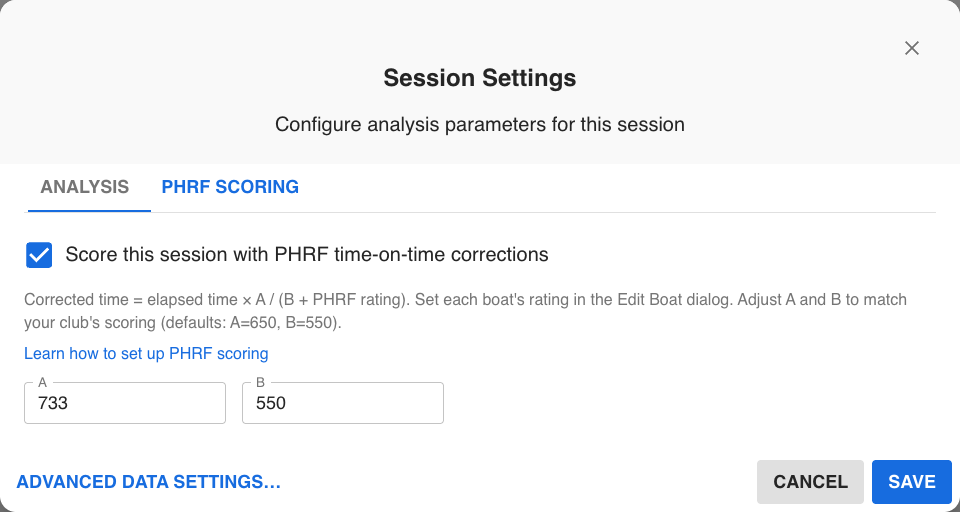
PHRF scoring is enabled separately for each session. This lets the same boats participate in both handicap and one-design sessions without corrected times appearing where they do not belong.
2. Enter each boat's PHRF rating
In the performance table or boat card, open the boat's settings menu and choose Edit Boat. Enter the boat's PHRF Rating, then click Save.
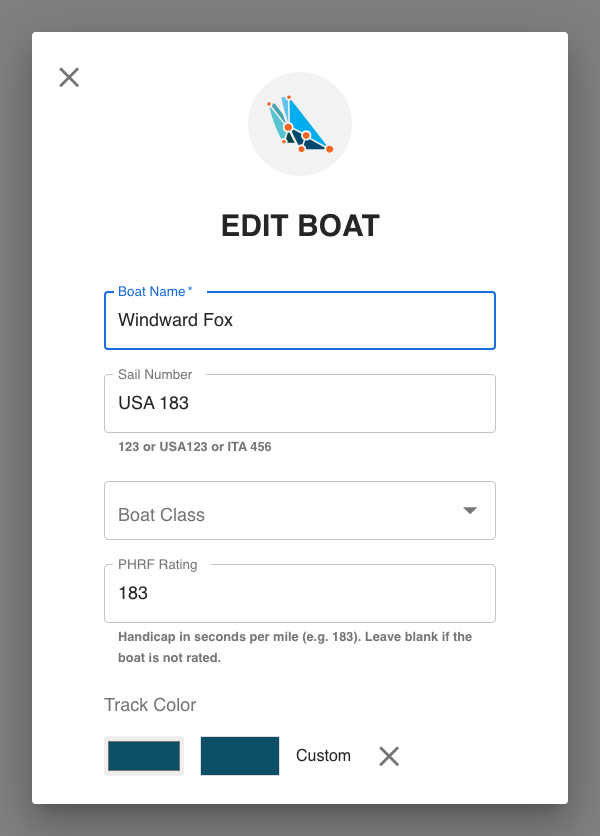
Repeat this for every boat in the session. The rating is saved with the boat, so you do not need to enter it again each time that boat appears in a new session. You can edit the rating later if its certificate changes.
Use the rating adopted by your race committee for this race. Ratings can differ by region, course type, or configuration.
3. Check the corrected results
Open the race performance table or create a session report. For each rated boat, ChartedSails shows elapsed time and Corrected time. Reports also include the PHRF rating used in the calculation.
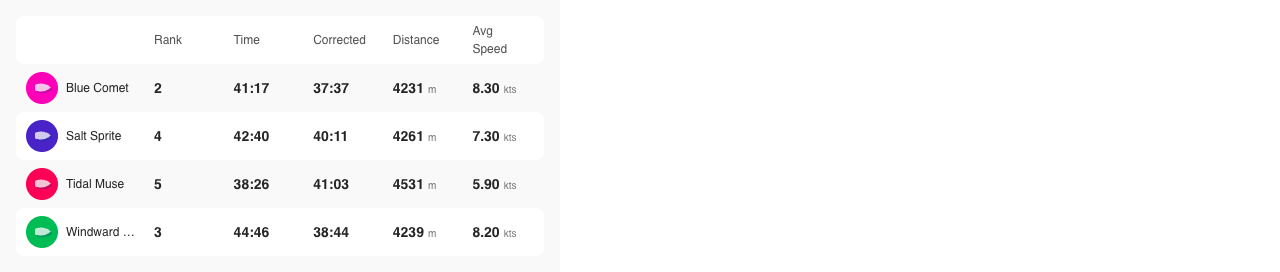
ChartedSails calculates:
corrected time = elapsed time × A ÷ (B + PHRF rating)
The performance table keeps its Rank column in finish-line order while showing corrected time alongside elapsed time. In session reports, when every finisher has a rating, the ranking, Delta, and overall points use corrected time. This follows RRS Appendix A, Rule A3 for a handicap system.
If only some finishers have ratings, corrected times still appear for the rated boats, but report rankings remain based on elapsed time. This prevents an incomplete set of ratings from producing a misleading corrected order.
Troubleshooting
The Corrected column does not appear
Open Session Settings → PHRF Scoring and confirm that PHRF scoring is enabled for this session.
A boat has no corrected time
Open Edit Boat and add its PHRF rating. A blank rating produces a blank corrected time.
The result differs from the race committee spreadsheet
Check the A and B constants in Session Settings and the rating assigned to each boat. ChartedSails uses time-on-time scoring; confirm that the comparison spreadsheet does too.
For the story behind this feature, read PHRF Corrected Times—and the Fleet Champion Who Made Them Happen.